
This post includes a reference to StrmExt.dll (see point 8).
There are many references from people that ADS are 'hidden'. I know why, but they are becoming more visible. In Windows 7, at the command prompt add the /R switch to the dir command to view the ADS streams attached to a file or folder.
I liked the concept of StrmExt.dll but not for what I wanted. First there are two known issues with the DLL:
1. Click Delete to delete a stream. User is prompted are 'you sure'? Click No and the stream is deleted anyway.
2. Multiple instances of the file property sheet cause the streams to appear under the wrong file. NOT NICE.
This code has been around for a long time. The former issue has been posted before. I have not seen anyone post anything about the latter issue. Side note: This DLL is for 32-bit systems only. Others have post 64-bit versions, but I suspect many of them still have the above bugs.
What I wanted was a property sheet that used ADS to add custom metadata to a file or folder. In this way, adding metadata would not change the file contents in any way. From that Metadata Streams was born.
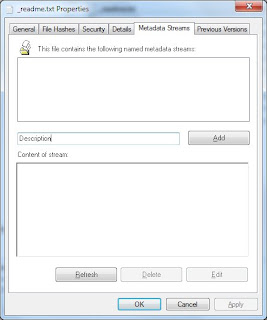
Fill in the text box (in the middle of the property sheet; not sure I like the location) with the name of metadata field... click Add. It will launch Notepad where you enter the actual data for the field you named. When creating a new metadata item Notepad will prompt you, indicating the file (more specifically the metadata stream) does not exist. Click Yes and enter the text you want to appear for that metadata item.

After saving your text close Notepad then click the Refresh button (on the Metadata Streams tab) to refresh the list of metadata entries. Select a metadata item and the contents of the stream will appear in the text box. Click Edit to edit an entry... or Delete to delete it.
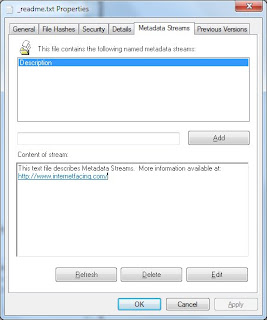
That's about it.
Each metadata stream is named using the field name you supplied prefixed with "metadata.", in this way Metadata Streams will only list those streams created by Metadata Streams.
I thought providing links in a metadata stream would be useful, so if you provide a link in your stream (such as: http://www.internetfacing.com) Metadata Streams will automatically detect it and display it as a link.
Metadata streams support the following types of links:
http:
file:
mailto:
ftp:
https:
gopher:
nntp:
prospero:
telnet:
news:
wais:
...the first few being the most useful.
The link must not have any embedded spaces. Convert embedded spaces with %20
Eg.
file:c:\folder\folder one\my file.pdf
file:c:\folder\folder%20one\my%20file.pdf
Also worth noting is that ADS is not supported by all devices. It is supported by NTFS devices. Copy a file that contains ADS' to a device that does not support them and ADS contents will not be copied with the file. The same would be true if you emailed a file. I have a few USB memory sticks that are formatted NTFS so when I copy a file the ADS streams go with it.
If you want to search for text in your metadata streams try SearchMyFiles--a free download. It is an excellent searching tool. It includes a search option to search streams attached to files. At last check it did not search streams attached to folders.
There are two flavours of Metadata Streams, a 32-bit and a 64-bit version, which should work on XP, Vista and Windows 7.
To Download: Metadata Streams
To install:
Open zip file and copy all the files in the install kit to a new folder location. (e.g. c:\MetadataStmExt ). I recommend you keep the folder contents after the install as it contains a readme file (be sure to read it—all of it) and an uninstall.bat.
Run the Install.bat as an administrator (right-click on the batch file and select “Run as administrator”) and follow the instructions. The installation batch will detect whether you need the 32-bit or 64-bit component.
To uninstall:
Run the uninstall.bat as an administrator (right-click on the batch file and select “Run as administrator”) and follow the instructions.


 How about an interface that says push, but they want you to pull?


