
Web site designers are continuous challenged with striking a balance with the implementation for various screen resolutions. When content needs to extend the width of the page users with low resolutions find the site more difficult to navigate. Having to excessively scroll the page horizontally and vertically to view content prevents the users from getting a better overview of the page.
When helping people solve various computer issues I find many individuals do not want to increase the screen resolution on their computer. They find text becomes too small. I do not understand how they tolerate the excessive navigation required the view many sites. I am coming to the same conclusion with numerous mobile devices--excessive navigation to get the job done.
If you are a Windows users and want to keep your screen resolution low, but want to reduce navigation issues when visiting specific sites try these hot keys:
Ctrl - (control key and minus sign) to zoom out, increasing screen resolution
Ctrl + (control key and plus sign) to zoom in, decreasing screen resolution
Ctrl 0 (control key and zero) to reset zoom
You should find success with Chrome and Internet Explorer.
Showing posts with label User Interfaces. Show all posts
Showing posts with label User Interfaces. Show all posts
Sunday, February 27, 2011

Monday, February 9, 2009
User Interfaces - I'll never be happy
Engineers, product designers, and software developers have been struggling for years to get the user interfaces so they are usable. There have been studies, methodologies, white papers, and such on the subject for decades. Sometimes they do get it right. Many times they do not.
How useful is this message box?

How about that car of yours in the driveway. For the most part the steering wheel has not changed--still in the same position--still round. The stick is still there and the peddles have not moved much.
You can look it up in your owners manual. It will be as helpful as looking up "Unexpected error" in the Microsoft documentation.
How useful is this message box?
Who or what is unexpected? I think the user believes it is very unexpected and presenting them with an OK button is a lovely touch. I'm sure the user will be fine with this, rather OK with it.
There are so many new interactive devices that have presented new challenges. The web added it's own look and feel; the cell phone added another set. How about mp3 players which morphed into video players. Cameras sure have changed since I purchased my 35mm.
How about that car of yours in the driveway. For the most part the steering wheel has not changed--still in the same position--still round. The stick is still there and the peddles have not moved much.
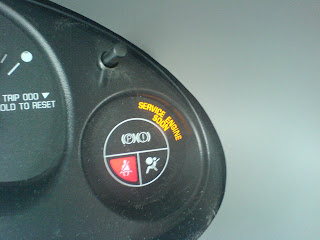
However, no matter how flashy they make the dash it is still not right. Some feedback on speed is good--that has not changed in 100 years. With all this new technoglogy and we still have stupid lights on the dash.
Ever have this lovely light come on?
Ever have this lovely light come on?
You can look it up in your owners manual. It will be as helpful as looking up "Unexpected error" in the Microsoft documentation.
Windows provides numerous other areas to look up errors that might help the user find out why something occurred. For example, in the Control Panel-->Administrative Tools I could launch the Event Viewer and review the many logs. There are many times I have been able to locate the real reason for the issue. This is what our cars need... an event viewer under Administrator tools. I do not want to be charged $100 / hr to find out a code that says "Unexpected Error".
There are even more simple devices that we just cannot get right. How about those every day doors you must open. Like the ones that provide a user interface that says pull but does not work. Ever pull on this type of handle and have the door pull back.
 How about an interface that says push, but they want you to pull?

I think they got this door handle right... I have not used this door... but I hope it's a push handle.

Thanks to dorsia from flickr on the use of the "real push" handle image.
There are even more simple devices that we just cannot get right. How about those every day doors you must open. Like the ones that provide a user interface that says pull but does not work. Ever pull on this type of handle and have the door pull back.
How about an interface that says push, but they want you to pull? I have come to hate doors... just more unexpected errors.
I think they got this door handle right... I have not used this door... but I hope it's a push handle.
Thanks to dorsia from flickr on the use of the "real push" handle image.
Subscribe to:
Posts (Atom)

