Saturday, March 10, 2012

Capturing file metadata

When a data file supports metadata I tend to make use of it. Whether researching, investigating, or otherwise any daily activities, I find, using metadata to be helpful. In this approach the metadata would be embedded in the file and therefore by adding metadata I am actually changing the content of the file.

MS Windows, over time, has addressed metadata, but not to the extent where I can add custom metadata to any type of file or folder.

Many years ago Microsoft made available a DLL (StrmExt.dll) that you drop into your Windows\System32 folder that once registered with the system would enable a new tab to appear on the Properties page of a file (you know, in Windows Explorer, right-click on a file or folder-->select properties). Using this new tab on the Properties page window the user could add alterative data streams (ADS) to a file. This component, though useful, did not directly address the metadata needs. Link to MS download (source code and StrmExt.DLL)

Whether you are familiar or not with ADS you'll find this post useful to understand ADS and the DLL: Dissecting NTFS Hidden Streams

This post includes a reference to StrmExt.dll (see point 8).

There are many references from people that ADS are 'hidden'. I know why, but they are becoming more visible. In Windows 7, at the command prompt add the /R switch to the dir command to view the ADS streams attached to a file or folder.

I liked the concept of StrmExt.dll but not for what I wanted. First there are two known issues with the DLL:

1. Click Delete to delete a stream. User is prompted are 'you sure'? Click No and the stream is deleted anyway.

2. Multiple instances of the file property sheet cause the streams to appear under the wrong file. NOT NICE.

This code has been around for a long time. The former issue has been posted before. I have not seen anyone post anything about the latter issue. Side note: This DLL is for 32-bit systems only. Others have post 64-bit versions, but I suspect many of them still have the above bugs.

What I wanted was a property sheet that used ADS to add custom metadata to a file or folder. In this way, adding metadata would not change the file contents in any way. From that Metadata Streams was born.
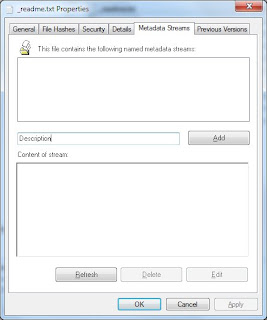
Fill in the text box (in the middle of the property sheet; not sure I like the location) with the name of metadata field... click Add. It will launch Notepad where you enter the actual data for the field you named. When creating a new metadata item Notepad will prompt you, indicating the file (more specifically the metadata stream) does not exist. Click Yes and enter the text you want to appear for that metadata item.

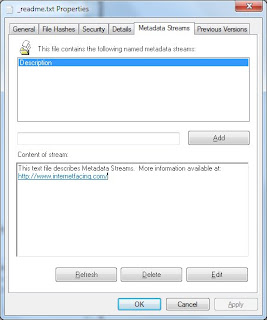
After saving your text close Notepad then click the Refresh button (on the Metadata Streams tab) to refresh the list of metadata entries. Select a metadata item and the contents of the stream will appear in the text box. Click Edit to edit an entry... or Delete to delete it.
That's about it.

Each metadata stream is named using the field name you supplied prefixed with "metadata.", in this way Metadata Streams will only list those streams created by Metadata Streams.

I thought providing links in a metadata stream would be useful, so if you provide a link in your stream (such as: http://www.internetfacing.com) Metadata Streams will automatically detect it and display it as a link.

Metadata streams support the following types of links:

http:
file:
mailto:
ftp:
https:
gopher:
nntp:
prospero:
telnet:
news:
wais:

...the first few being the most useful.

The link must not have any embedded spaces. Convert embedded spaces with %20

Eg.

file:c:\folder\folder one\my file.pdf

file:c:\folder\folder%20one\my%20file.pdf

Also worth noting is that ADS is not supported by all devices. It is supported by NTFS devices. Copy a file that contains ADS' to a device that does not support them and ADS contents will not be copied with the file. The same would be true if you emailed a file. I have a few USB memory sticks that are formatted NTFS so when I copy a file the ADS streams go with it.

If you want to search for text in your metadata streams try SearchMyFiles--a free download. It is an excellent searching tool. It includes a search option to search streams attached to files. At last check it did not search streams attached to folders.

There are two flavours of Metadata Streams, a 32-bit and a 64-bit version, which should work on XP, Vista and Windows 7.

To Download: Metadata Streams

To install:

Open zip file and copy all the files in the install kit to a new folder location. (e.g. c:\MetadataStmExt ). I recommend you keep the folder contents after the install as it contains a readme file (be sure to read it—all of it) and an uninstall.bat.

Run the Install.bat as an administrator (right-click on the batch file and select “Run as administrator”) and follow the instructions. The installation batch will detect whether you need the 32-bit or 64-bit component.

To uninstall:

Run the uninstall.bat as an administrator (right-click on the batch file and select “Run as administrator”) and follow the instructions.

Saturday, August 13, 2011

Tracking genealogical information -- Drupal Content Types

My first two sites with Drupal were: A personal genealogical site with very restricted access; and a site for the Shaver Family Reunion group who are descendants of John William Shaver who settled in Ancaster, Ontario, Canada in the late 1700s.

Check out the Shaver Family Reunion group’s website, also known as the “Shavers of Ancaster”. The amount of site content is still a bit limited, but is growing. With content growth the group comes up with more ideas on what and how to track information.

From a genealogical perspective, you’ll find the obvious content types: person, place, event, and family. From there other types of content are emerging: document, publication, and organization. The idea of a definition and a note content type are coalescing into a content type, I call, write-up. The user can define the type of write-up they want: note, process/procedure, instruction, troubleshooting entry, FAQ, or a web link entry.

Take a look at the Shavers of Ancaster site and let me know what you think (comment here or use the Contact us page on the Shaver’s site. If you are a descendant of John William Shaver you are welcome to submit a request for an account. If not, but you’d like a Drupal site for your family history like this or have ideas you’d like to share... drop me line (use the Contact us form on the Shavers of Ancaster site).

In the meantime, the design and implementation remain very fluid.

Saturday, August 6, 2011

Tracking genealogical information and other stuff -- a CMS solution

I have a large collection of information I’d like to track. With an interest in photography, history, and family history there are plenty of things for me to track, a large cache of physical items and computer files.

I keep adding and removing software tools from the mix to help with this never ending goal.

After working on a web site to track family history and genealogical relationships using Drupal (a content management system) I began to expand the focus of what it could track. In some cases I would not mind some of my data being Internet facing. However, most of the items and information I would not want the risk of Internet exposure.

I liked the simplicity and flexibility of web-based content management systems (CMS) over the many desktop applications I had been using. Without creating a home server I simply elected to install Microsoft’s WebMatrix. Selecting the development environments I wanted to create, I installed Drupal, WordPress and ASP.NET development environments for starters.

With a few clicks I had a site up and running locally. With a couple of changes to the site settings the site was available to my home network.

For the most part, the data I want to track is housed under one parent folder on my computer. So, to ensure the web site had access to these files I created a virtual directory and I was ready.

Sunday, February 27, 2011

Excessive browser navigation

Web site designers are continuous challenged with striking a balance with the implementation for various screen resolutions. When content needs to extend the width of the page users with low resolutions find the site more difficult to navigate. Having to excessively scroll the page horizontally and vertically to view content prevents the users from getting a better overview of the page.

When helping people solve various computer issues I find many individuals do not want to increase the screen resolution on their computer. They find text becomes too small. I do not understand how they tolerate the excessive navigation required the view many sites. I am coming to the same conclusion with numerous mobile devices--excessive navigation to get the job done.

If you are a Windows users and want to keep your screen resolution low, but want to reduce navigation issues when visiting specific sites try these hot keys:

Ctrl - (control key and minus sign) to zoom out, increasing screen resolution
Ctrl + (control key and plus sign) to zoom in, decreasing screen resolution
Ctrl 0 (control key and zero) to reset zoom

You should find success with Chrome and Internet Explorer.

Friday, September 25, 2009

A Windows MUST HAVE

How dependent are you on the mouse wheel? It is a MUST HAVE. Right? Have you noticed how some applications behave differently with the wheel. Some applications (like Outlook and Picasa) allow you to hover your mouse pointer over a panel or window control, without clicking on it, but the mouse wheel enables the user to scroll the control. And, then there is Windows Explorer. For a long time I have been frustrated when I move my mouse pointer over either of the two panels and the wheel does not work, rather works on the wrong panel, because I failed to give it focus (i.e. click on it).

Well, here is a feature that should be in the O/S.

Well, productivity is about to go up because the grumbling is about to go down. I am an avid reader of Lifehacker, but I missed this posting a few weeks back: Wheel Here Switch Windows with Mouse Wheel.

Download this one as described (i.e. no installer... just plunk the files down and put a shortcut in the Startup folder and... Bob's your uncle.) What I like about this is I can simply hover the mouse arrow where ever I go, roll the mouse wheel and I'm there--or Here as it were.

Sunday, June 7, 2009

Bing; noun: a heap or pile; verb: obsolete

When a search engine comes out I at least give it a try and then find myself back at Google.  My first search engine (back in the '90s) was dogpile.com.  Now, like many others, when I want to  search for something I Google it.  Last week I started to Bing it. I have not made the full leap just yet.  Nor have I fully returned to Google.  I decided to try out both at the same time and track how well each did.  The results were mixed.  Since I work in a .NET software development shop I did find Bing to locate the best results for me.  When it came to personal searches and anything outside Microsoft, Google provided the best results.

Next week I plan on using the Blind Search.  Here you can perform a search that will return three results sets: one from Google, one from Bing and one from Yahoo--but you will not know which is which (if you view the source you'll know--so don't cheat!).  Then you vote on the result set you think was best.   I started today and decided to use WebNotes.net to help track how the statistics are changing over time.

The author of Blind Search highlights a few issues with the approach.  However, give Blind Search a try.

Here are my webnote entries for today:
2009/06/07 10:28 - Google: 40%, Bing: 37%, Yahoo: 23% | 2,606 votes
2009/06/07 13:57 - Google: 45%, Bing: 33%, Yahoo: 22% | 9,853 votes

...more later.

I think Bing (commericals) has a lot of potential.  But, I don't see me fully dropping Google either.  Bing got high marks as it ranked internetfacing.com much higher than Google ever has.  :)

Friday, March 13, 2009

Applications began to crash and printer list will not show

Vista got it's nickers in a twist on a laptop and caused numerous unwanted behaviour recently.  Paint.NET crashed, Word 2007 would not open, and the Control Panel-->Printers would not complete to show known printers.
 
Word apparently, upon start-up, attempts to make use of the default printer, and since the Control Panel couldn't list the printers, Word found itself in a nice little Frank Sinatra state (do-be-do-be-do).
 
I found Excel to be working okay--apparently it does not need to know about the default printer at start-up.
 
It was unknown at the time how Vista got inself into this state, but it became very clear to me that one of the components was a remote network printer--which was currently not available.  The computer hosting the remote printer was in an error-free state (off).  Rebooting the laptop did not solve the problem--the nickers were twisted so tight that some serious tools might be required.
 
Instead of reporting printer not available Vista simply hung up and left the user in a state of no repair--rendering the machine useful for a door stop or at best a poor writer's lap desk.
 
To fix the issue I simply turned the remote computer on and ensured the remote printer was available.  Then rebooted the laptop that was left for dead.  Nickers were immediately untwisted and all was well again.
 
What concerned me was that if the laptop was out of range of it's default printer or the remote printer server was removed from service and the nickers became twisted there was no way to untwist them.  So to prevent from getting caught with our pants down again the default printer is no longer a remote printer.

Saturday, February 28, 2009

Herman Hollerith

FORTRAN was the first computer programming language I learned.  As a grade 10 high school student, at the time, I was introduced how the programming language was used to process numeric calculations and character strings. The Hello World application would be something like this...
    WRITE (6,500)
500 FORMAT (11HHELLO WORLD)
STOP
From this example we learned about Herman Hollerith and what he had achieved.  Not since learning FORTRAN have I heard much about Hollerith.  The characters in the Format statement above mean... 11 Hollerith characters follow... they being HELLO WORLD.

In 2000 I dragged my family to Bletchely Park (near Milton Keynes, England).  They were not impressed.  I was overly impressed with the war time code breaking that had secretly taken place there--I felt like a kid again enjoying the stories and sites.  On the grounds was a collection of computers and unit record equipment.  Around the room where old mini and micro computers all in working order.  However, in the middle of room hidden behind other relics was a rusted out peice of equipment that caught me eye.  My wife and kids immediately looked for the exit.

The machine was a tabulating device designed by Hollerith.  I pushed my way through the first generation of desktop digital computers to get a better look at the tabulating device.  It was good to see Hollerith's mark on computer history again.

In 1896 Herman Hollerith founded the Tabulating Machine Company, a company he was able to start after working with the US Census Office to solve their overwhelming need to process census data.  Herman designed a punch card that was the same size as the US currency in order to take advantage of Treasury Department money boxes.  He designed the card with 24 columns each with 12 punch positions--the foundation for the definition of a digital representation of our character set.

In 1911 Hollerith's company merged with three other firms to become the Computing Tabulating Recording Corporation. In 1924 it was renamed International Business Machines (IBM).

Herman Hollerith shares a unique trait with many others. He was born on February 29, 1860, only being able to truly celebrate his birthday every four years.

Saturday, February 21, 2009

Social face2face Networking

My wife recently posted a blog entry on the popular topic of social media networking, (SMN) highlighting the importance of more opportunities with SMN than just web presence with your web site.

Recently, I found some interesting social media networking going on in the retail market---where the media in this case is face to face (f2f).

This past week I have observed that staff in our local Wal*mart have lost that personal touch. Even the greeter is not greeting us. That Wal*mart concept of the greeter needs to be ingrained into all staff members. Employees need to be approachable, show a smile, node a head, or say hello.

The Zeller's customer service representative was very pleasant to me last weekend, however, decided to chew out a student member of staff for sending me to customer service. This act occurred right in front of me. What the Zeller's customer service rep failed to know was how pleasant and helpful the student was to me--perfect sales rep in every way!

I have observed in our local Home Depot store this past month that every member of staff has become the Wal*mart greeter. In every aisle where a member of staff was working I would receive, at a minimum a greeting of a smile that said "hello"--a message that they were approachable. In return to receiving professional solutions to my never ending home improvement issues I continue to return to Home Depot. I couldn't get out of Wal*mart or Zellers fast enough.

So, take those online social skills to your f2f customers.

Monday, February 9, 2009

User Interfaces - I'll never be happy

Engineers, product designers, and software developers have been struggling for years to get the user interfaces so they are usable. There have been studies, methodologies, white papers, and such on the subject for decades. Sometimes they do get it right. Many times they do not.

How useful is this message box?


Who or what is unexpected? I think the user believes it is very unexpected and presenting them with an OK button is a lovely touch. I'm sure the user will be fine with this, rather OK with it.

There are so many new interactive devices that have presented new challenges. The web added it's own look and feel; the cell phone added another set. How about mp3 players which morphed into video players. Cameras sure have changed since I purchased my 35mm.

How about that car of yours in the driveway. For the most part the steering wheel has not changed--still in the same position--still round. The stick is still there and the peddles have not moved much.

However, no matter how flashy they make the dash it is still not right. Some feedback on speed is good--that has not changed in 100 years.  With all this new technoglogy and we still have stupid lights on the dash.

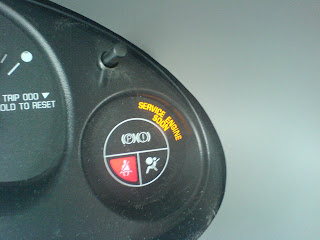
Ever have this lovely light come on?


You can look it up in your owners manual. It will be as helpful as looking up "Unexpected error" in the Microsoft documentation.

Windows provides numerous other areas to look up errors that might help the user find out why something occurred. For example, in the Control Panel-->Administrative Tools I could launch the Event Viewer and review the many logs. There are many times I have been able to locate the real reason for the issue. This is what our cars need... an event viewer under Administrator tools. I do not want to be charged $100 / hr to find out a code that says "Unexpected Error".

There are even more simple devices that we just cannot get right. How about those every day doors you must open. Like the ones that provide a user interface that says pull but does not work. Ever pull on this type of handle and have the door pull back.

How about an interface that says push, but they want you to pull?  


I have come to hate doors... just more unexpected errors.

I think they got this door handle right... I have not used this door... but I hope it's a push handle.


Thanks to dorsia from flickr on the use of the "real push" handle image.

Monday, January 26, 2009

BBC returns a major player to the air

While living in England I became a fan of many British entertainers. British humour is way out there--and I love it. When I first saw Graham Norton on his show "So, Graham Norton", I was shocked at his uncensored comments. However, I had to laugh and was soon a regular viewer.


Being a Monty Python fan--I loved their shows and movies even more. And, if you haven't seen Dave Gorman--get out there and Google him (or Googlewhack him) right now.


Another favourite entertainer of mine is Jonathon Ross. Ross almost lost his job at the BBC with a live, on air, stunt. Last year Ross and the comedian Russell Brand left a series of messages on the answering machine of the actor Andrew Sachs in which they made crude remarks about Sachs' 23-year-old granddaughter, Georgina Baillie. I will not debate the appropriateness of the incident but did not feel Ross or Brand should be sacked over it.

Ross has a brilliant radio program on BBC Radio 2 on Saturday mornings and a hit TV show on BBC television. This past week Ross returned to his radio and TV spots.

The only comment I'll say about Ross' show is this: Leno has Kevin Eubanks. Letterman has Paul Shaffer. Ross has four puffs and piano.

Friday, January 9, 2009

It's official, I'm a Flexitarian

I knew there would be term for it.

At various times during the past decade the females living in our household made the switch and became vegetarians. I tried usual lures to get them back. Oven roasting with a lovely roast beef to the overwhelming aroma of bacon frying on Sunday morning were all tried to no avail.

Instead my son and I had, by default, with little effort on our part, dramatically reduced our meat intake. However, with the occasional dinner out to Harvey's (and the list goes on) we are not vegetarians.

According to this posting today I think my son and I can be labeled flexitarians. Okay, we do not fit the model of flexitarians they are suggesting. Our meat intake was not reduced because of climate change. However, I feel that being a vegetarian does not necessarily help out with climate issues. There is the small matter of the other things we all do... i.e. all that waste in take out orders; not to mention the other junk in our diets. I'm sure my family can highlight a nice long list of crap I eat (don't bother commenting).

It's Friday. Shelley, shall we eat out tonight (no take away, a place with real dishes)?

Thursday, January 8, 2009

The Answer to my music collection

My music collection is made from very different genres. My collection consists of music from every decade since 1940 and includes easy listening, big band, country, bluegrass, blues, R&B, pop, rock and roll and rock (a.k.a. proper rock). Artists from Glenn Miller, Dean Martin, Bette Midler, Danny and the Juniors, Earl and Scruggs, Jim Croce, Nitty Gritty Dirt Band, Paul Simon, Deep Purple, AC/DC, and Led Zeppelin. Hey, whatever happened to the Humber River Valley Boys?

My all time favourite album is Deep Purple's Made in Japan. They may not be my favourite group of all time, but they are in amongst the top two. I was introduced to this album in 1973 when my father worked for Warner Bros Records. Since then I have had three things I wanted to see in life--The Coliseum in Rome, the Great Pyramids, and Deep Purple live.

I saw the Coliseum in September 2003 and Deep Purple's final concert with Jon Lord (keyboards) in 2002 at the NEC in Birmingham, Northamptonshire--Two out of three--not bad. I have been looking for more music to fill the proper rock category of my collection--Deep Purple, Led Zeppelin, and AC/DC style. Back in September I found what I was looking for.

I am a regular viewer of the Rock n Roll TV podcast with Share Ross. On this particular podcast she introduced the Irish group, The Answer. They are absolutely brilliant. They mentioned they were working on an album, but their first album, The Rise, had been out for some time. I struggled to find a copy. My daughter's boyfriend, from England, too struggled to get a copy. However, on Christmas Eve the album arrived. For £9.99 (I gave him $20 Canadian) I received the special edition copy.

The Answer are opening for AC/DC in Toronto at the Roger's Centre tomorrow night.

If you love proper rock--here is the answer to your collection--The Answer.

Wednesday, January 7, 2009

More details please

Whether reading a book, a blog, or the newspaper I find writers assume the reader has a given set of skills or knowledge on the topic being read. Newspapers are typically written for an easy read, but in many cases the article assumes I know something about the area or the topic. If you dive right in you may get lost not knowing who Joshua Chamberlain is and how he is associated with GETT. If you know what GETT means you might know Chamberlain. I was taught to define my acroynms when I first use them. I deliberately did not do that here to help me with my point.

Whether it be a casual read or a technical read I like it when the author spells out the acryonm, summarizes the situation and tell us who the players really are--not just a name. Have you performed a web search on Chamberlain yet?

See how well I do here on the next paragraph!!

I read with interest this week about David BeBee and Mathew McCarthy, two photojournalists for the Kitchener Record, who have started a blog called "A Year on the Grand". I asked them (they are looking for feedback and ideas) if they were going to cover the Grand River from source to mouth. They both individually replied with yes. I also suggested that they geo-tag each blog entry so the reader knows exactly where the image on the Grand River was taken. It is this sort of information that extends the information and helps to provide context for the reader.

One more example. For Christmas, my wife gave me a video entitled Gettysburg and Stephen W. Sear's book, not associated with the video, but with the same title. After watching part of the video I decided to get out the book. Though I was following the story and drama of the video I failed to pay much attention to the names and places being mentioned. I am no historian and by no means do I know much about the battle of Gettysburg. Oddly, I was able to follow along in the book with the video. I was able to get officer profiles, further battle information, and maps, all giving me reference and context to the video.

BTW, in the video Jeff Daniels played Lieutenant Colonel Joshua Chamberlain and GETT is the acronym for Gettysburg National Military Park (US National Park Service). See, don't you hate it when the writer does not tell you this stuff up front.

Thursday, December 11, 2008

It's a Jib Jab Life!

I received an e-Christmas card from my daughter today. This is what our kids do with our pictures. This is cruel and very funny. Thanks, Angela and Merry Christmas.

Try JibJab Sendables® eCards today!

Tuesday, December 9, 2008

Remembering Grace Hopper

Back in college I remember learning about early computers, compilers and the story of the first reported bug.  When learning compiler concepts of the day, students and staff enjoyed discussing stories about Grace Hopper. Keep in mind, as I will remind you from time to time, I graduated before the release of the first PC.

In 1986, while attending the DECUS Spring Symposium in Dallas, Texas, I learned that Grace Hopper was giving an evening talk in the main auditorium of the Dallas Convention Center. I remembering grabbing a quick dinner and finding a seat in the nose bleed section.  Grace was absolutely brilliant talking about the days when she worked on the Mark I and how it was us, the young, that would change computing.


A short time later I learned that Grace was to appear on Late Night with David Letterman.  I immediately found a VHS tape (remember the time period).


Grace was born on this day in 1906.  I wonder if she'd like how software engineering has evolved.

Saturday, November 22, 2008

SearchWiki - there are benefits

I read a blog entry this week that highlighted that people do not buy features; they buy benefits--when you make that final decision to buy you have done so to fulfil a benefit need.

This week Google launched SearchWiki, a feature available to only registered Google users, "a way for you to customize search by re-ranking, deleting, adding, and commenting on search results."

It appears some folks are not seeing the benefits.  Though there are a few things about SearchWiki I would enhance or change, I can see some benefits.

Today my daughter asked me to look into a web cam software component on her notebook that has been bothering her for the past few weeks.  When she attempted to launch the application it displayed a pop-up with "Acer OrbiCam application has stopped".  So using that as my search criteria I proceeded to look for a solution.  After reading about half a dozen postings I found the solution she needed.  I find myself repeating history and re-searching so I proceeded to "promote" the link that provided the solution and added an appropriate note.

However, others may benefit from my note.  When future searchers perform the same search and then click on "See all notes for this SearchWiki" they'll see my promotion and note and hopefully find a solution to the problem.  If others do the same on other searches to other problems it will help us all find solutions quicker.

Now for the strange bit of behaviour: On Friday I used a third party computer and tried this feature out with my Google account.  Earlier today I used it on my daughter's notebook with my account.  Now that I'm finally logged into my own computer--the feature is not appearing; and yes I am logged into my Google account.

Craig